|
Recommend to a friend
Home Page
Products
Documentation
CAD Support
Download
Purchase, Price list
Contact us
Support
OEM version
Partners
News
11/15/2020
Released MITCalc 1.76
05/27/2019
Released MITCalc 1.75
08/30/2018
Released MITCalc 1.74
07/10/2017
Released MITCalc 1.73
04/01/2016
Released MITCalc 1.72
08/29/2014
Released MITCalc 1.70a
01/21/2014
Released MITCalc 1.70
|
CAD Support
2D CAD systems:
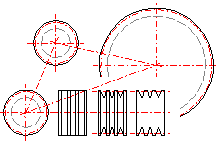
Most of the calculations allow direct output to major 2D CAD systems.
Just choose your CAD system in the calculation and select the desired view
(a projection type). A drawing is then saved directly in the CAD system with
the correct scale and system of layers.
Supported CAD systems at this time: DXF file, AutoCAD, AutoCAD LT, IntelliCAD, Ashlar Graphite, TurboCAD,
BricsCAD, ZWCAD, ProgeCAD....
Note: The design is fully open; you can connect other CAD systems or
define new drawing templates based on the calculated values.
3D CAD systems:
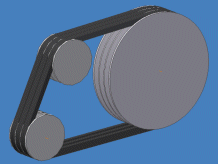
These are supported by a form of independent installation that includes,
in addition to calculations, the respective parametric models and interface
between Excel and the respective 3D CAD system. An assembly may consist of not only individual
components but also groups of components (sub-assemblies). For example, you
can insert one complete solution of a belt gear at once, which is fully
associative, and the dimensions of the inserted component (sub-assembly)
will change automatically in case you make changes to the calculation
parameters later.
Supported CAD systems:
- Autodesk Inventor
(ver.: 5.3, 6.0, 7.0, 8.0, 9.0, 10.0, 11.0, 2008... 2019
...)
- SolidWorks
(ver.: 2001 Plus; 2003; 2004, 2005, 2006, 2007, 2008... 2019
...)
- Solid Edge
(ver.: 15, 16, 17, 18, 19, ... ST10 ... and next)
- Creo (Pro/ENGINEER) (Details: COGRAS
spol. s r.o.)
|